Tell ChatGPT about your brand, services, and goal. It can organize the requirements and site structure before VIXNODE builds the pages.
Your prompt“I want a website for my dessert studio with our story, products, FAQs, and a LINE contact.”
Intelligent AI helps you realize every creative idea.
Create, preview, and publish your website directly from your phone. AI helps you turn ideas into a live site instantly, wherever you are.
ChatGPT × VIXNODE
You do not need to learn web design first. Tell ChatGPT what you need, and VIXNODE turns your idea into a real website.
Tell ChatGPT about your brand, services, and goal. It can organize the requirements and site structure before VIXNODE builds the pages.
Your prompt“I want a website for my dessert studio with our story, products, FAQs, and a LINE contact.”
ChatGPT plans a sitemap around your industry, content, and goals, then VIXNODE creates the pages and shared structure.
Your prompt“I run an interior design studio. Plan all the pages I need for a complete website.”
Describe the feeling in everyday words. ChatGPT translates it into clear design direction that VIXNODE can build.
Your prompt“Make it minimal, refined, and Japanese-inspired—not too commercial and without lots of gradients.”
ChatGPT defines color, type, spacing, imagery, and layout, while VIXNODE applies those choices to the real page.
Your prompt“Make my website feel more premium while keeping it clean and simple.”
ChatGPT turns your logo, colors, and positioning into visual rules that VIXNODE can apply across every page.
Your prompt“Here are my logo and brand colors. Make the entire website feel like one consistent brand.”
Give ChatGPT your rough notes. It shapes the headline, service copy, FAQs, and calls to action, then VIXNODE places them on the page.
Your prompt“We have made handcrafted desserts for ten years. Keep the copy warm, not salesy, but help people feel ready to order.”
Send ChatGPT a screenshot. Point to what should change, and the VIXNODE Plugin updates the matching page section for you.
Your prompt + screenshot“This area feels crowded. Enlarge the visual, make the heading smaller, and move the button below.”
Describe your brand, scene, colors, and purpose. ChatGPT creates custom website visuals, and VIXNODE places them into your hero, banner, or content.
Your prompt“Create a hero visual for my Japanese dessert brand: natural light, cream tones, and a wooden table—not a stock-photo look.”
ChatGPT defines a shared composition, palette, lighting, and visual language, then extends it to images for every page.
Your prompt“Keep every new image consistent with the home page: natural light, low saturation, and warm wood tones.”
Ask ChatGPT to check the mobile experience, and VIXNODE adjusts text, image crops, spacing, tap targets, and reading order.
Your prompt“Check this page on mobile and fix anything that is hard to read or tap.”
Explain your business goal. ChatGPT identifies helpful content and features, and VIXNODE builds or connects them.
Your prompt“I run a yoga studio. Visitors should see classes, find us, join LINE, and book a trial.”
ChatGPT checks content, SEO, and launch tasks, then VIXNODE guides you through preview, setup, and publishing.
Your prompt“The website is nearly finished. Check what is left before I can officially launch it.”
After launch, use ChatGPT to change copy, visuals, prices, events, or services. VIXNODE updates and publishes the exact change.
Your prompt“Change the Mid-Autumn gift box price from NT$680 to NT$720. Do not change anything else.”
Empower yourself with control over webpage design!
Adjust layouts and styles freely to give your website a unique and personalized touch.
Utilize advanced AI technology for effortless manipulation and customization of webpage content without any coding knowledge.
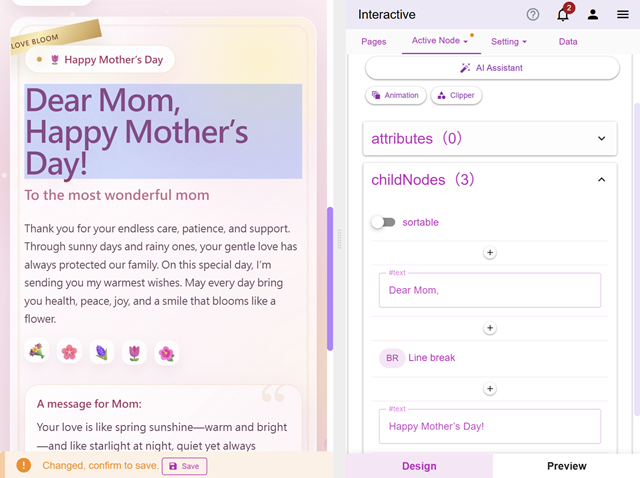
After modifying webpage content, the real-time preview feature enables users to instantly see the changes, ensuring the website's presentation meets expectations.
Modify, add, or delete element attributes such as className, cssStyle, childNodes, giving users complete control over the appearance and behavior of their websites.
No programming knowledge required
Easily add elements, edit content, and transform your thoughts into stunning creations.
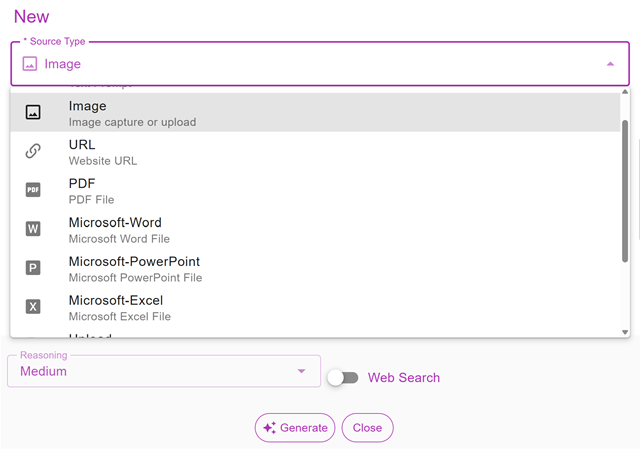
Select the source to import, or prompts, or images. Click "Start," and the browser preview will instantly display the imported or AI-generated web page.
Click on the elements you wish to modify within the preview. On the right, you'll see element attributes, including className, cssStyle, and childNodes.
More operational details see the Docs
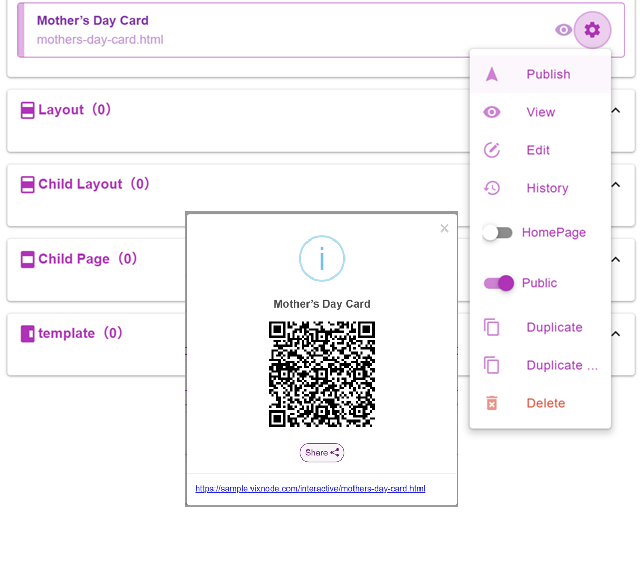
Once satisfied with your design, click "Save." Select page attributes, and then click "Publish" to make your website live. You can also preview the website on your mobile device.